Data Server implementation?

I have an Actisense NGX hooked up to my nav computer at the helm. Being lazy, I like to lounge on the sofa and use my laptop to do route planning. I currently use the Data Server feature on the helm CE to feed the NMEA data to the planning laptop. After reading the “Not Implemented Yet” comments about the transmit/repeater features, I’m wondering if this is something you’re going to bring forward? If not, can you suggest an alternative?

1 Like

Yes, v4.5 will have something very similar to the Data Server but much easier to use. In fact I expect it will be in this week’s update and I’m looking forward to getting your feedback on it! (And your testing with the NGX as we only have an NGT-1 to test with.)

2 Likes

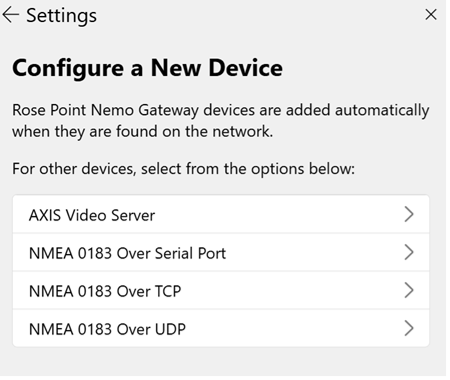
The Data Server replacement and Actisense NGT-1 support were included in today’s update. I think that the NGX is similar enough to the NGT that it will just work. To try that, use “Settings > Electronics > Configure a New Device > Actisense NGT-1” and select the serial port it’s connected to.
I’m not seeing the Actisense option:

Oops…we forgot something and it’s only enabled for Rose Point employees. Sorry about that! We’ll get another update out right away.

An update is out now, it really should include the Actisense option for you this time!

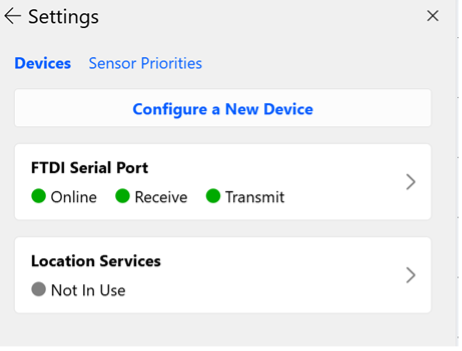
So… on my helm workstation, I have an NGX-1-USB that I normally configure as “NMEA 0183 over Serial” port on COM4 at 38400 baud. This works great in 4.5. If I delete that configuration and instead configure an “Actisense NGT-1” on COM4 then it says “Online” but no data is received.

Is this the expected configuration on the “server” side?

It also seems like the helm workstation is acting as a data server even when I configure as “NMEA 0183 over Serial” as my laptop 4.5 seems to be getting TCP data on the default port. If this is true then what benefit is there to using the Actisense port configuration?

The device page on the “server side” should show a list of NMEA 2000 devices, messages being received, and a raw data display. Since that isn’t appearing for you, the NGX must not be as compatible with the NGT as I thought. We’ll probably need to get one so we can do testing with it here…

Here’s my “server side” for reference:

The “client side” Electronics page should have something like this (but “Rose Point” will be “Coastal Explorer” or “Rose Point ECS”, “(DreamQuest)” will be the name if the computer acting as the server, and COM3 will be the name of the serial port on the server):

And clicking on that to get to the device page should show something like this:

I’m not sure what you mean by “even when I configure as “NMEA 0183 over Serial” as my laptop 4.5 seems to be getting TCP data on the default port”. But if it’s that you are seeing the NMEA 0183 data from the NGX on the client via the new feature, then that is to be expected as it works with both NMEA 0183 and NMEA 2000 data.

The benefit to using the Actisense port configuration (when it works) is that it uses NMEA 2000 messages rather than NMEA 0183. For some setups this doesn’t really mean much, but NMEA 2000 supports a much wider variety of sensor types than NMEA 0183. When the NGX is in its “translate” mode, it can only translate information for which there is a standard translation and other information is lost. For example, if you had battery or tank level sensors, or engine monitors, none of that information has an NMEA 0183 equivalent so Coastal Explorer could only get the information via NMEA 2000.

Some good news: I was able to make it work by using the Actisense support software to manually put the NGX into Transfer mode and setting the baud rate to 115200. By default, the NGX is in Covert (i.e. “translate”) mode at 38400 baud. The NGX user manual says it will automatically switch to Transfer mode when it detects a “compatible app”. No explanation of how that is determined.

Interesting…thanks for that bit of info! Hopefully we can get that to happen automatically.

I took a quick look at the Actisense SDK. The test app called “nmea_reader_console” looks like it has the code of interest.

	/* Remember the device's current mode so we can restore it on exit. */
	std::optional<OperatingMode> previousMode;
	{
		SyncSignal sig;
		session->getOperatingMode(2s, [&](ErrorCode code, std::string_view msg,
										  std::optional<OperatingMode> mode, ResponseOrigin) {
			if (code == ErrorCode::Ok && mode) {
				previousMode = mode;
				std::cout << "[INIT] Prior operating mode: " << OperatingModeName(*mode) << "\n";
			}
			else {
				std::cerr << "[WARN] Could not read prior operating mode: " << msg << "\n";
			}
			sig.signal();
		});
		sig.wait(3s);
	}

	/* Switch to Rx-All so every PGN on the bus is forwarded to the host. */
	std::cout << "[INIT] Setting operating mode -> NgTransferRxAllMode...\n";
	{
		SyncSignal sig;
		session->setOperatingMode(OperatingMode::NgTransferRxAllMode, 5s,
			[&](ErrorCode code, std::string_view msg, ResponseOrigin) {
				if (code == ErrorCode::Ok) {
					std::cout << "[INIT] Rx-All enabled.\n";
				}
				else {
					std::cerr << "[WARN] Could not set Rx-All mode: " << msg
							  << " (continuing anyway)\n";
				}
				sig.signal();
			});
		sig.wait(6s);
	}

***** do stuff *****

	/* Restore the device's prior operating mode on a clean exit. */
	if (previousMode) {
		std::cout << "[EXIT] Restoring operating mode -> " << OperatingModeName(*previousMode)
				  << "...\n";
		SyncSignal sig;
		session->setOperatingMode(*previousMode, 3s,
			[&](ErrorCode code, std::string_view msg, ResponseOrigin) {
				if (code != ErrorCode::Ok) {
					std::cerr << "[WARN] Could not restore operating mode: " << msg << "\n";
				}
				sig.signal();
			});
		sig.wait(4s);
	}

Thanks, but we are setting the operating mode, or at least attempting to… I suspect it’s the baud rate which is fixed at 115200 in Coastal Explorer since that’s what the NGT-1 uses. If the NGX is expecting 38400 and Coastal Explorer sends the operating mode command at 115200, the NGX will only receive gibberish. We’ll need to add something to figure out what baud rate the NGX is using at startup before sending any commands.

That makes sense. I originally set the interface to 38400 as I thought that was the “standard” for 0183 HS traffic but it appears the NGX doesn’t care. I just set it to 115200 and it’s fine.