I am using Coastal Explorer 4 on Windows 11 with touchscreen mode enabled.
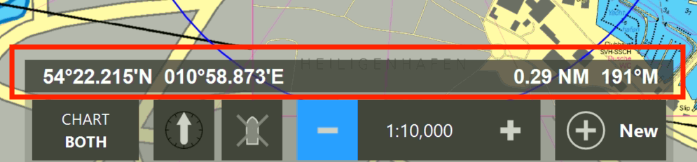
Zooming in and out works fine. However, above the control scale there is a navigation bar that shows the position, distance, and course to the mouse pointer when moving over the chart.
When using the touchscreen, I can tap on the chart, but this “navigation bar” does not appear or update in the same way. Is there a way to use this feature in touchscreen mode?
At the moment, I am using the app “Tablet Pro Touch” to simulate mouse input on the touchscreen, to use the “navigation bar” but this is not a good solution.
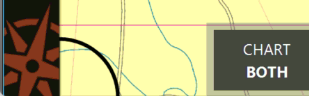
Not that particular feature which was specifically designed for use with a mouse or similar pointing device. But you might want to check out the little known Chart Loupe feature which probably hiding in the lower-left corner of your chart.
Unless you’ve moved somewhere else, you should see a quarter circle in the lower left corner of your chart. That’s the loupe in its default docked state, but it can be docked on any edge or corner. Drag the loupe on to the chart to use it, click on its display to cycle through a few different options, and move it to a corner or edge when you’re done with it.